
Feb
4
2010

CSS3 Box-Shadow with Inset Values – The Aqua Button ReReVisited!
By Tomomi Imura  //  CSS, Dev, Firefox, Opera, Sandbox, WebKit  //  33 Comments

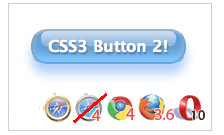
Screenshot ot CSS Aqua buttons

This is my third article on CSS3 No Image Aqua Buttons. The previous articles include:

  1. CSS3 Gradients: No Image Aqua Button
  2. CSS3 Aqua Button – Revisited for Firefox 3.6
  3. And this one – Read on!

Since Smashing Magazine has selected the original Aqua button demo for their article, “50 Brilliant CSS3/JavaScript Coding Techniques”, I have had so much more visitors to my blog.

This resulted quality developers leave useful comments and tips for me – thank you, Zoley for suggesting using box-shadow with the inset value, and a big thank you to Jim for actually re-writing the Aqua button with the technique!!!

So, now the CSS3 Aqua button is revised with semantic markup (no more “glare” div! Yes, I complained it by myself before!) and shorter CSS.
And this time, no CSS gradients! – use CSS box-shadow property with multiple inset values to draw layers of inner-shadows to create the visual effect.

Syntax

(-moz-)box-shadow: none | <shadow> [,<shadow>]* where <shadow> is defined as: inset? && [ <offset-x> <offset-y> <blur-radius>? <spread-radius>? && <color>? ]

Values

from Mozilla Developer Center:

inset (optional)
If not specified (default), the shadow is assumed to be a drop shadow (as if the box were raised above the content).
The presence of the inset keyword changes the shadow to one inside the frame (as if the content was depressed inside the box). Inset shadows are drawn above background, but below border and content.

<color> (optional)
If not specified, the color depends on the browser. In Gecko (Firefox), the value of the color property is used. Safari’s shadow is transparent and therefore useless if <color> is omitted.

<offset-x> <offset-y> (required)
This are two <length> values to set the shadow offset. <offset-x> specifies the horizontal distance. Negative values place the shadow to the left of the element. <offset-y> specifies the vertical distance. Negative values place the shadow above the element.
If both values are 0, the shadow is placed behind the element (and may generate a blur effect if <blur-radius> and/or <spread-radius> is set).

<blur-radius> (optional)
This is a third <length> value. The higher this value, the bigger the blur, so the shadow becomes bigger and lighter. If not specified, it will be 0.

<spread-radius> (optional)
This is a fourth <length> value. Positive values will cause the shadow to expand and grow bigger, negative values will cause the shadow to shrink. If not specified, it will be 0 (the shadow will be the same size as the element).

Note – The box-shadow property has been removed from W3C CSS3 Background Candidate recommendation document.

The Entire Code!

Use -moz and -webkit prefix for box-shodow to support these browsers. For Opera, there’s no need to add -o.

Also, notice there are three inset values are defined for detailed visual effects!


<input type="button" class="new-aqua" value="Login"/>


input[type=button].new-aqua {
  width: 155px;
  height: 35px;		
  background: #cde; 
  border: 2px solid #ccc; 
  border-color: #8ba2c1 #5890bf #4f93ca #768fa5; 
  font: 600 16px/1 Lucida Sans, Verdana, sans-serif; 
  color: #fff; 
  text-shadow: rgba(10, 10, 10, 0.5) 1px 2px 2px;
  text-align: center; 
  vertical-align: middle; 
  white-space: nowrap; 
  text-overflow: ellipsis; 
  overflow: hidden;
  border-radius: 16px; -moz-border-radius: 16px; -webkit-border-radius: 16px;
  box-shadow: 0 10px 16px rgba(66, 140, 240, 0.5), inset 0 -8px 12px 0 #6bf, inset 0 -8px 0 8px #48c, inset 0 -35px 15px -10px #7ad;
  -moz-box-shadow: 0 10px 16px rgba(66, 140, 240, 0.5), inset 0 -8px 12px 0 #6bf, inset 0 -8px 0 8px #48c, inset 0 -35px 15px -10px #7ad;
  -webkit-box-shadow: 0 10px 16px rgba(66, 140, 240, 0.5), inset 0 -8px 12px 0 #6bf, inset 0 -8px 0 8px #48c, inset 0 -35px 15px -10px #7ad;
}
.new-aqua:hover {
  text-shadow: rgb(255, 255, 255) 0px 0px 5px;
}


View the live demo page! This new aqua button works on FF 3.6, Webkit 4 (the current Safari 4 doesn’t support inset box-shadow yet), Chrome 4 and Opera 10. (But fails on 10.1 on Mac).

* Edited on Feb.5 – Opera 10.1 fail and Safari4 (I noticed this works only on Webkit Nightly after published this!)

And again, a huge thanks to Jim Green for the revised CSS!

References

33 Comments to “CSS3 Box-Shadow with Inset Values – The Aqua Button ReReVisited!”

  • Hi, i seem to be having some trouble with the new aqua button on Google Chrome 4 on Windows 7. It is showing a blue square behind the button. probably as a result of the inset. This does not happen with the older version of the button.

  • thanks for the report Aiaikevr!
    it sounds like Chrome 4 on Windows7 does not render it in the same way the one for Mac OS.

    I am honestly not sure about the implementation of multiple inset shadow on Webkit so I need some more research.

  • I don’t have Windows 7 to test on, but I know if the border radius is set too small, you get square corners rather than rounded. Might that be the problem?

  • Hmmm… now i feel that Ipublished this too soon :-p
    I needed more testing on different browsers and OSs.

  • no you did not publish this too soon ;)
    its great to have a forward thinking example like this.
    the code is correct, the browsers just need to implement it the way it should be.

    so i dont think you need to rethink your code, i think you need to file a bug report ;)

    btw its not the border , i see the rounded corners , the button looks good, it just has a solid filled blue rectangle behind the nice looking button.

    i can’t believe i mistyped my name last time…

  • I have the same “box behind the button” issue with the latest nightly of Chrome on Windows XP as well as the official release and the beta release.

  • [...] CSS3 Box-Shadow Button with Inset Values (Aqua Button) [...]

  • [...] CSS3 Box-Shadow Button with Inset Values (Aqua Button) [...]

  • We unashamedly used your previous button as inspiration for our WebKit for iPhone mobile site, making them grey to fit our theme and I meant to say a big thanks before now, so thank you very much!

    I have to say they make perfect sense on the iPhone; those extra few kB over Edge really do make a massive difference to the user experience.

  • [...] CSS3 Box-Shadow Button with Inset Values (Aqua Button) [...]

  • [...] ■CSS3 Box-Shadow Button with Inset Values (Aqua Button) CSS3で光沢感のあるボタンを表現しています。 上記の他にもボタンに特化して、様々なCSS3のボタンテクニックが公開されています。かなり細かい表現まで可能みたいで、今まではphotoshopで作っていた部分もかなり代替できそうな気がします。まだブラウザの問題がありますが、いずれはCSS3で組んでいくのが当然になる日もやってくるかもしれませんね。 [...]

  • The reason this may not work on Chrome, Safari and other webkits is that the existing releases (not nightly releases) don’t support the inset property on box shadow. When they hit the key term, they kill the whole declaration, not just that one portion of the shadow declaration.

    http://www.standardista.com/css3/css3-border-properties#bshadow – when that looks like a meteor in webkit, we’ll know it’s working. It still looks like a blob.

  • [...] former occurs within a Form tag and can be used to submit a form of data when clicked (and you can style it up all you want!). The latter is simply an Anchor tag disguised as a big clickable button, which is the focus of [...]

  • Hi,

    maybe you’ve already grasped the issue with chrome on windows but anyway the problem is the inset shadow together with rounded corners. Chrome just does not get it right (on win)

    http://code.google.com/p/chromium/issues/detail?id=29427

  • Hey, loved your buttons so much that we half-inched them and re-colored them chartreuse for our new shoe shop:
    http://www.sundanceshoeshop.com/collections/shoes-1

    Thanks!

  • [...] CSS3 Box-Shadow with Inset Values – The Aqua Button ReReVisited! 上記サイトではCSSのみでとてもキレイなアクアボタンを再現しています。 [...]

  • [...] 14. CSS3 Box-Shadow with Inset Values – The Aqua Button ReReVisited! [...]

  • wohh exactly what I was searching for, thankyou for posting .

  • Cheers for the material. I found it very helpful and look forward to reading your posts in the future. Great blog.

  • [...] 14. CSS3 Box-Shadow with Inset Values – The Aqua Button ReReVisited! [...]

  • Just figured out that changing the selector from
    .new-aqua:hover

    to

    input[type=button].new-aqua:hover

    makes hover work properly on Chrome and Firefox 4.

  • [...] CSS3 Gradient no Image Aqua buttons [...]

  • This is awesome!!! Thanks for sharing. I was wondering if you had any ideas on how to perfect a circular css “button” rather than a rounded corner rectangle?

    I tried these mods to your code but it does not look right. It appears the circular photoshop aqua buttons have more of an oval bubble at the top rather than a partial circle. Any advice appreciated! Many thanks!

    input[type=button].new-aqua

    {

    width: 100px;

    height: 100px;

    background: #cde;

    border: 2px solid #ccc;

    border-color: #8ba2c1 #5890bf #4f93ca #768fa5;

    font: 600 16px/1 Lucida Sans, Verdana, sans-serif;

    color: #fff;

    text-shadow: rgba(10, 10, 10, 0.5) 1px 2px 2px;

    text-align: center;

    vertical-align: middle;

    white-space: nowrap;

    text-overflow: ellipsis;

    overflow: hidden;

    border-radius: 50px; -moz-border-radius: 50px; -webkit-border-radius: 50px;

    -webkit-box-shadow: 0 10px 16px rgba(66, 140, 240, 0.5), inset 0 -8px 12px 0 #6bf, inset 0 -45px 0 12px #48c, inset 0 -100px 15px -10px #7ad;

    }

  • [...] CSS3 Gradient no Image Aqua buttons [...]

  • Luiz, yeah I just tried on Chrome. and you’re right! not sure why just using the class name fails.

    and Ly, I don’t think you can alter/distort the shape of the shadow. using “transform” would alter the whole shape, so I can’t think of the good solution without adding extra element there.
    I would like to know if somebody figures out!

  • [...] CSS3 Box-Shadow Button with Inset Values (Aqua Button) [...]

  • Awesome blog! Thanks for posting.
    Buttons look the best I’ve seen.
    Also, thanks Luiz Marques for update with Firefox.

    Wondering if its possible to get some kind of hover working in IE9.
    Also, any suggestions for IE8 and earlier as they don’t render so well there?

  • So after a while looking, I decided to view it at its best in firefox (assuming that’s the best display of it) and take screen captures of it with both hover and active, then create a CSS image sprite and use that for all versions of IE. In IE on hover, you just reposition the image around to display the hover/active one. Also added conditional comments for the page to render image sprite button instead and it works perfectly and looks exactly the same in all versions of IE now.

  • [...] The CSS3 the Button [...]

  • [...] not only loads in a snap but also looks great and scales to your text. Downloads and Docs »Demo »CSS3 Box-Shadow Button with Inset Values (Aqua Button)There’re plenty of tutorials that describe how to create a sexy aqua button with Photoshop, but [...]

  • [...] CSS3 Box-Shadow with Inset Values – The Aqua Button ReReVisited! This tutorial demonstrates how to create a cool CSS3 aqua button with no images. [...]

  • [...] CSS3 Button [...]

Leave a comment