
28
CSS3 Aqua Button – Revisited for Firefox 3.6
This is an update for the Aqua button tutorial. This update will add a support for Firefox 3.6. If you haven’t seen the article, please go read it before proceeding here.
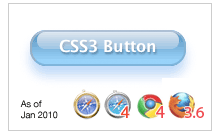
On the end of November last year, Mozilla Hacks announced the support for CSS gradient in a background on upcoming Firefox 3.6 (which final version has just released recently).
As already been supported on WebKit, FF does support both linear and radial gradient, however, Mozilla has implemented differently –
Most noticeably, Mozilla separate linear and radial gradient as -moz-linear-gradient and -moz-radial-gradient, while on WebKit, the syntax goes -webkit-gradient and you specify linear or radial.
Also the specification of each value is different too.
If you want a linear gradient starting from red on top to ending at bottom in white, you need to define –
WebKit:
background: -webkit-gradient(linear, left top, right bottom, from(red), to(white)))
Firefox:
background: -moz-linear-gradient(top, red, white);
The Aqua Button Redefined
Let’s re-create the aqua button, by adding -moz prefixed gradient definitions:
The button:
.aqua{
background-color: rgba(60, 132, 198, 0.8);
border-top-color: #8ba2c1;
border-right-color: #5890bf;
border-bottom-color: #4f93ca;
border-left-color: #768fa5;
-webkit-box-shadow: rgba(66, 140, 240, 0.5) 0px 10px 16px;
-moz-box-shadow: rgba(66, 140, 240, 0.5) 0px 10px 16px;
background-image: -webkit-gradient(linear, 0% 0%, 0% 90%, from(rgba(28, 91, 155, 0.8)), to(rgba(108, 191, 255, .9)));
/* for FF 3.6 */
background-image: -moz-linear-gradient(rgba(28, 91, 155, 0.8) 0%, rgba(108, 191, 255, .9) 90%);
}
and the glare:
.button .glare {
position: absolute;
top: 0;
left: 5px;
-webkit-border-radius: 8px;
-moz-border-radius: 8px;
height: 1px;
width: 142px;
padding: 8px 0;
background-color: rgba(255, 255, 255, 0.25);
background-image: -webkit-gradient(linear, 0% 0%, 0% 95%, from(rgba(255, 255, 255, 0.7)), to(rgba(255, 255, 255, 0)));
/* for FF 3.6 */
background-image: -moz-linear-gradient(rgba(255, 255, 255, 0.7) 0%, rgba(255, 255, 255, 0) 95%);
}
This is the actual html page. Open it on Firefox 3.6 and see!
More Info on Mozilla CSS Gradients
- CSS gradients in Firefox 3.6 by HACKS.MOZILLA.ORG
- -moz-linear-gradient by Mozilla Developer Center
- -moz-radial-gradient by Mozilla Developer Center


[...] (Jan 28, 2010): I added a Firefox support to this tutorial. Please visit the “revisited” article [...]
FYI, the Mozilla syntax is probably how it will be once this is standardized by the W3C (minus the moz-prefix of course)
its nice
also you can add something similar to gradient, just use -moz-box-shadow with the inset value and with a big blur radius
excellent tutorial….Thanks
This is using the method Zoley mentioned… (no glare div needed! and I put the style on the more semantic input element)
input[type=button].aqua {
background: #cde; border: 2px solid #ccc; border-color: #8ba2c1 #5890bf #4f93ca #768fa5; padding: 4px 20px 8px; font: 800 16px/1 Lucida Sans, Verdana, sans-serif; color: #fff; text-shadow: rgba(10, 10, 10, 0.5) 1px 2px 2px;
text-align: center; vertical-align: middle; white-space: nowrap; text-overflow: ellipsis; overflow: hidden;
border-radius: 16px; -moz-border-radius: 16px; -webkit-border-radius: 16px;
box-shadow: 0 10px 16px rgba(66, 140, 240, 0.5), 0 -8px 12px 0 #6bf inset, 0 -8px 0 8px #48c inset, 0 -35px 15px -10px #7ad inset;
-moz-box-shadow: 0 10px 16px rgba(66, 140, 240, 0.5), 0 -8px 12px 0 #6bf inset, 0 -8px 0 8px #48c inset, 0 -35px 15px -10px #7ad inset;
-webkit-box-shadow: 0 10px 16px rgba(66, 140, 240, 0.5), 0 -8px 12px 0 #6bf inset, 0 -8px 0 8px #48c inset, 0 -35px 15px -10px #7ad inset;
}
.aqua:hover {text-shadow: rgb(255, 255, 255) 0px 0px 5px;}
Jim, this is amazing!
Now the button is semantic with less css – and yeah, gradients is gone but still gets visually similar effect on the aqua-look!
I’d like to write another blog entry with the new code but do you have your web/blog that I can link to?
I want to credit you but you got no last name either! I’d like to know which Jim you are
[...] CSS3 Aqua Button – Revisited for Firefox 3.6 [...]
Hey Tomomi,
Thanks for your consideration!
Umm, no website I would dare promote, unfortunately… I think the apt expression is, “The cobbler’s children wear no shoes.” I do have some ancient work up at Coroflot if you really want to link to something (www.coroflot.com/trickitty).
Apologies for not formatting the code to be human-legible… I tend to keep everything in a stream of consciousness manner. Oddly, it’s easier for me to see it this way, but I’ve never been a fan of concrete poetry either.
There are some hiccups with the rendering of the CSS. Google Chrome has an outstanding issue containing inset shadows when border-radius is applied… and only the latest Safari understands “inset” value. Then, again, only the 3.6 version of Firefox is able to render gradients.
One last thing… after posting, I got to thinking that I should have experimented with making the inset shadows RGBA values (the background, as well) to see if some translucence could be achieved. Too tired to mess with that tonight, so I’ll leave it for you to try. (^_^)
Hi Jim! Now I know slightly more about you
I knew the box-shadow inset value, and knew box-shadow could have multiple values, but I didn’t think of using multiple inset values to create the effect, and would not come up with this idea by myself.
I thought this is totally a blog-worthy so I just wrote up a new entry, as re-re-visited Aqua button
Learning something new is a good thing. -ah I sound like Marth Stewart :-p
oh, and the colors look nice so I keep then as is.
I leave this for anybody who wants to replicate/customize the buttons can play with color experiments
the second version of the CSS doesn’t quite work as expected – I’m assuming it’s supposed to copy the first version
but the mouse-over doesn’t quite work in any browser I tested
chrome 4 also has a box behind the button
[...] Kode disamping kanan adalah kode yang saya gunakan untuk contoh efek glossy yang berwarna biru. Dan untuk tutorial lengkap pembuatan efek glossy, bisa dibaca disini. [...]
Fantastic posting, thanks a lot!
Great post, thanks!
BTW you can have “text-shadow” working on Opera 10.51, by changing your into an tag… and using a bit of padding instead of “width” and “height” to get the same final rendering.
Oops! I meant: “changing your ‘input’ into an ‘a’ tag.”
Sorry.
Ooooo good to know! (< using a instead of input)
Thanks Taliesin!
[...] CSS3 Aqua Button: Die Erstellung eines MAC-Aqua Buttons über pures CSS (keine Grafiken) [...]
I’ve been learning CSS for awhile now and I’m glad we’ll be able to create snazzy looking buttons like this without images. I just wish all the browsers would get on board and start supporting stuff. It’s so hard when you are first starting out to learn how to code it all, and then add even more code to support lame browsers. : )
[...] CSS3 Aqua Buttons, No Images [...]
Nice trick, good job Admin and Jim!
Thanks for sharing
[...] Kode disamping kanan adalah kode yang saya gunakan untuk contoh efek glossy yang berwarna biru. Dan untuk tutorial lengkap pembuatan efek glossy, bisa dibaca disini. [...]
Thanks for the useful posting!