

Creating Non-disruptive Notifications with HTML5
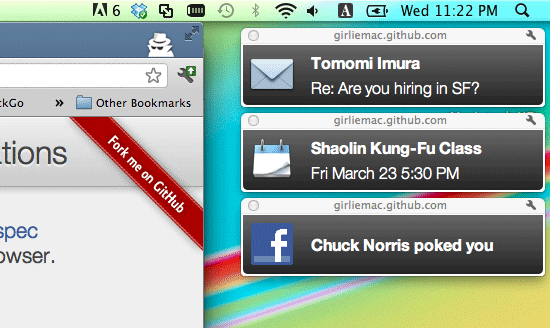
Update: The API I used for this article has been deprecated by W3C, and the example code no longer works on the latest browser. I have updated the code with using the new specification so please take a look at my github repo.
Thanks!
The HTML5 Web Notifications API (now available on Chrome) allows you to display the Growl-like notification windows outside of the web browser window. Unlike the alert dialog, the notification windows do not disrupt a user’s action, or requires extra user interactions.
Using the API is quite simple, so I tried to replicate the infamous webOS notification system in HTML5. (In case you are not familiar with webOS UI and UX, see it on YouTube).
Live demo: http://girliemac.github.com/html5-notifications-webOS-style
Basic Notifications
First, check if the browser supports the API, by looking for the Notifications property.
if (window.webkitNotifications)
Apparently, it is only supported by WebKit-based browser (well, Chrome, so far) so you need to add the vender prefix, instead of just webkitNotifications.
Next, your script needs to requests the user agent to ask a user for permission to show notifications. If you are already familiar with the geolocation API, you have seen the “Info bar” on top of the browser.

To request the permission by requestPermission(), you must invoke some event from a user, such as mouse click. See the example below:
document.getElementById('#someButton').addEventListener('click', function() {
  // check if a permission is set allowed
  if (window.webkitNotifications.checkPermission() == 0) { // Allowed
    // do show the notifications
  } else {
    // request a user permission
    window.webkitNotifications.requestPermission();
  }
}, false);
There are two ways to create the notifications – plain text or html.
- Plain text- use
createNotificationfunction that takes three optional params, icon image, title, and text:
var notification = window.Notifications.createNotification(
  'avatar.png',
  'New tweet from @girlie_mac',
  'OMG, a glass of water! http://instagr.am/p/...'
);
- HTML – use
createHTMLNotificationto include an external html file:
var notification = window.webkitNotifications.createHTMLNotification('tweet.html');
To show the notification:
notification.show();
Also, you can use the cancel method to close the notifications if you wish. This example below let the notification close by itself 5 second after it is displayed:
notification.ondisplay = function(event) {
  setTimeout(function() {
    event.currentTarget.cancel();
    }, 5000);
}
Besides the ondisplay, other event handlers available are:
onclick, onshow, onerror, and onclose.
In my demo, I used the HTML notifications because only the HTML notification style allows you to fully customize the UI with CSS and add some UX with JavaScript.
To create the webOS-esque “slide-to-dismiss” effect, I used jQuery UI’s draggable and droppable. (I attempted to use the HTML5 drag and Drop, but for some reasons, I could not successfully make my code work within the notification window, although the code does work in a regular window.)
The source code is on github.
Hopefully, this API will be available on other browsers. (And Klout will replace the modal dialogs from hell to something more subtle like the web notifications in future. Can you believe once they had me to close seven modals after logging in? This has to be stopped no matter what.)
References
W3C Draft
Chromium API Specification
HTML5 ROCKS
comments powered by